
The boy in the sequin tuxedo
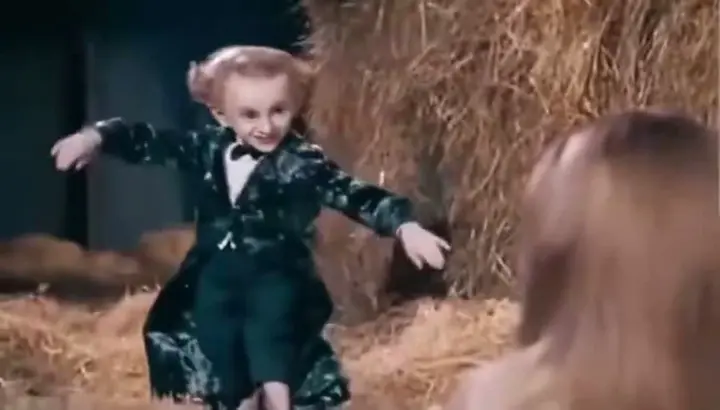
AI referenceA shiny black tuxedo and bow tie, arms spread wide, and a cheeky grin as the boy tiptoes past the hay bales. Posted on Instagram.
Put your own characters in the scene and join the Rumpelstiltskin AI video trend.
One dancer. One partner. Your own scene.
The character doing the Tip Toe dance
The character watching and reacting
JPG, PNG or WebP · Max 10 MB each
100 credits12 seconds · 720p MP4
Full 12s video · 720p · Music & MP4 download
5s · 480p · One try per account · Generation takes several minutesView one-time credit packsBasic Pack: $4.90 for 100 credits. One-time payment. Generation takes several minutes.
 Example video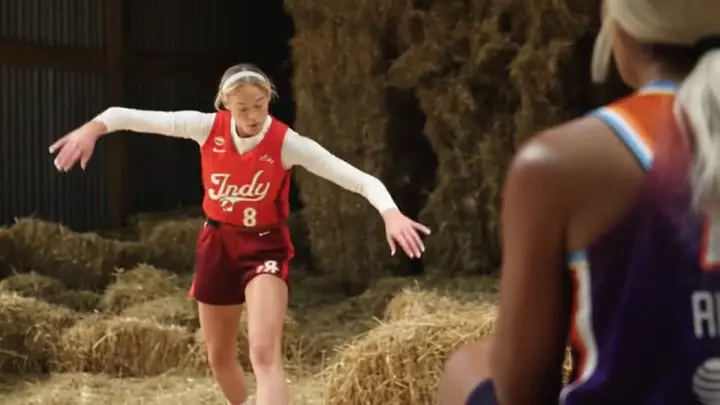
Same trend.
Your two characters.
Explore Tip Toe references and examples generated with TipTop AI. Press play to hear the sound.
A shiny black tuxedo and bow tie, arms spread wide, and a cheeky grin as the boy tiptoes past the hay bales. Posted on Instagram.
A red basketball jersey over a white long-sleeve shirt, arms stretched out, and playful footwork across the barn. Posted on TikTok by @tip.toe.n.my.jordans.
A red dress, pearls and black heels, arms spread wide, tiptoeing past a woman who cannot believe what she is seeing. Posted on Instagram by @sti_5ubarudude21.
A black jacket over a white T-shirt, a finger raised for a cheeky shh, and a mischievous look before the tiptoe begins. Generated with TipTop AI.
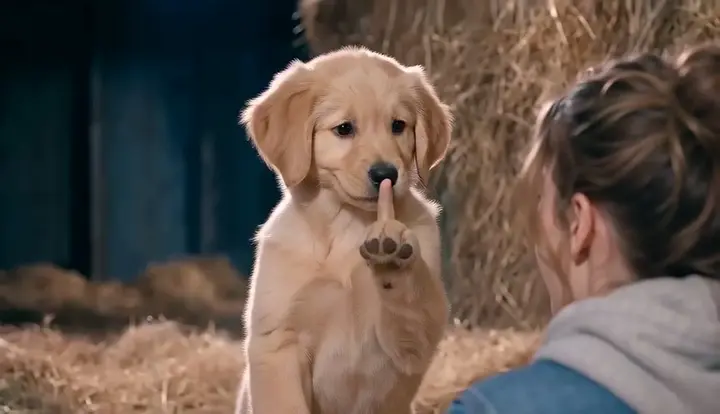
Floppy ears, golden fur and a tiny paw raised for a shh, bringing a playful twist to the hay-filled barn scene. Generated with TipTop AI.
Supplied reference videos, not a promise of identical output. Generated identity, movement and sound can vary.
The Tip Toeing In My Jordans trend pairs an AI-made fairytale barn dance with Riff Raff’s “Tip Toe Wing In My Jawwdinz.” A Rumpelstiltskin-style character shushes, grins and tiptoes through straw while a woman reacts in surprise. It is not a scene from the 1987 Rumpelstiltskin movie.
Know Your Meme traces the AI clip to Instagram in August 2026. Song-led edits spread on TikTok and X in late September and early October, followed by remixes with different people and characters.
TipTopAI lets you cast both roles with your own photos. Our prepared video and audio references guide the scene, camera cuts and dance. Try a free 5-second preview, then use credits for a full 12-second video with music.
Explore the Rumpelstiltskin AI templateUpload your character photos and let the template guide the performance. These six stills from the red-uniform character remix show the opening 5-second sequence, from the first hush to the start of the dance.

The red-uniform dancer faces the partner in a warm, hay-filled barn and begins a playful hush gesture.

The camera moves closer as the dancer holds the hush gesture and looks toward the partner.

Cut to the partner, eyes wide and a hand over the mouth, for the first surprised reaction.

Cut back to the dancer as the serious expression turns into a confident, knowing smile.

The partner lifts a hand to the head, keeping the back-and-forth exchange playful.

Return to both characters as the dancer bends, sways the shoulders and shifts weight to the music.
Your two photos define the dancer and partner. A preset action, camera and scene template guides the gestures, close-ups, reaction shots and barn setting, while an audio reference guides the rhythm. This is the simplest way to recreate the same style without writing a prompt or planning every shot yourself.
The full 12-second version continues into rhythmic toe taps, alternating steps and light turns, with dancer close-ups between performance shots. These frames come from the supplied red-uniform remix; shot timings are approximate and generated results can vary.
Try the template with my photosNo dance practice, prompt writing or editing timeline required.
Add a dancer photo for the Tip Toe performer and a partner photo for the character watching and reacting. Choose one clear subject in each image.
Sign in and choose Pay & Generate for a full 12-second, 720p video. You can also use Free try for one free 5-second, 480p preview per account.
After payment, generation starts automatically when credits arrive. Your full video includes music and a 720p MP4 download. Generation takes several minutes.
For meme fans, casual creators and friends who want a quick, playful remix for TikTok, Reels or Shorts. Start with photos and a ready-to-use scene, even if you have never edited a video.
Skip filming, choreography and manual editing. Upload two photos and start generation from the prepared template; processing time can vary.
The actions, camera cuts, barn scene and music reference are already built into the template. Upload your dancer and partner photos—no prompt writing needed.
Designed specifically to recreate the Tip Toe In My Jordans video style: the hush, surprised reactions, mischievous grin and rhythmic footwork. Your photos supply the cast.
Buy a one-time credit pack when you want full videos. There is no recurring plan, and purchased credits do not expire.
Sign in for one free 5-second, 480p preview per account. See your characters in the scene before paying for a full 12-second video.
Choose who dances and who reacts. Add one clear photo to Dancer and another to Partner, then try the free preview. No prompt or filming required.
Choose my two charactersUpload your dog or cat to Dancer and your own portrait to Partner. Choose a pet photo with the face and body clearly visible; the template guides gestures that suit the animal’s shape.
Put your photo in Dancer and your friend’s in Partner, or switch the roles. Use separate photos with one person in each, so the playful lead and surprised witness are easy to tell apart.
Cast one pet as Dancer and a second as Partner. Upload a separate photo for each pet instead of a group picture, then preview how their appearances and movements come through.
Choose a family member for the dancing lead and another for the reaction. Your photos guide their looks and clothing; the template supplies the barn, camera cuts and performance.
A sharp, well-lit image helps the model read your character. A full-body photo is useful when you want the feet and outfit to carry through.
Try 5 seconds in 480p free after signing in. Unlock a full 12-second video in 720p with one-time credits.
100 credits · ≈ 1 video
≈ $4.90 / video
300 credits · ≈ 3 videos
≈ $3.30 / video
800 credits · ≈ 8 videos
≈ $2.49 / video
Secure checkout Pay once · Use across models
TipTopAI turns two photos into a short AI dance video: one dancer and one partner. The Tip Toe template supplies the scene, movement and musical direction. You choose both characters. You can also switch to the Drake party template.
Upload two clear JPG, PNG or WebP photos: Dancer for the character performing the dance, and Partner for the character watching and reacting. Sign in and click Free try for a 5-second, 480p preview with music. Once it is ready, use credits to unlock a new full 12-second, 720p video using the same two characters. We provide the video and audio references.
Yes. This template follows the AI-generated barn-dance meme, rather than footage from the 1987 Rumpelstiltskin film. Your photos guide a new dancer and partner.
No editing app is required. Add your dancer and partner photos and use the prepared template in your browser. If you want to learn the dance yourself, watch the original reference for the footwork; this tool creates an AI performance from your two character photos.
Upload one photo per role. Dancer becomes the character doing the footwork; a full-body image can help. Partner becomes the character watching and reacting; use a clear portrait. Each photo should show one subject and be JPG, PNG or WebP, at least 300 × 300 pixels, up to 10 MB. Avoid blur and covered faces.
The generation uses a prepared audio reference to guide synchronized sound. The supplied examples retain their original audio. Generated sound, movements and timing can vary; preview your result before sharing. You can also select a sound in your social platform’s music library.
Each signed-in account gets one free 5-second, 480p Tip Toe preview. After it succeeds, unlock the complete 12-second performance in 720p with credits. Both include music and MP4 downloads. Choose landscape 16:9 or portrait 9:16. The separate Drake template offers 15 or 20 seconds.
Try one 5-second, 480p preview per account and IP address for free. Credit packs are one-time purchases, starting at $4.90 for 100 credits. A full Standard 12-second Tip Toe video uses 100 credits; other models use more. Purchased credits do not expire. Confirmed failed trials can be retried, and failed paid generations return reserved credits. Uncertain provider submissions are checked before retrying.
Join the Tip Toe trend on TikTok and Reels. Put your own characters in the scene, make it yours and post your version today.
Make my Tip Toe videoYour camera roll has a dancer and partner waiting to happen.
Make my Tip Toe video